
TypingMind And 240+ Apps: TypingMind app lets you use ChatGPT4 through a SetApp subscription, and it’s just $9.99 per month instead of $20. Plus, they have eight more AI apps and 240+ premium MacOS apps which you can use in the same $9.99 subscription without any limits and restrictions.
We all use different iOS and MacOS apps for work and personal tasks, but there are two big problems:
- It’s hard to find the perfect app; something is always missing.
- App prices can be too high, and you might have to settle for a free version or a less good alternative.
Setapp is the solution to these problems. Let’s see what is Setapp, explore its features, what’s unique about this platform, and other important details.
Table Of Contents 👉
What Is Setapp?

Setapp is a platform where you get a collection of the most popular and top-rated macOS, iOS, and web apps for a monthly or yearly subscription starting from $9.99. All the apps are fully functional, with no in-app purchases or any hidden charges.
It’s not like a traditional store where you have to pay every time you need a new app. With Setapp, you pay a fixed price once a month to get apps with their full functionality and no ads, extra charges, in-app purchases, or paid upgrades. When you download and install Setapp, all its apps become available with just a click.
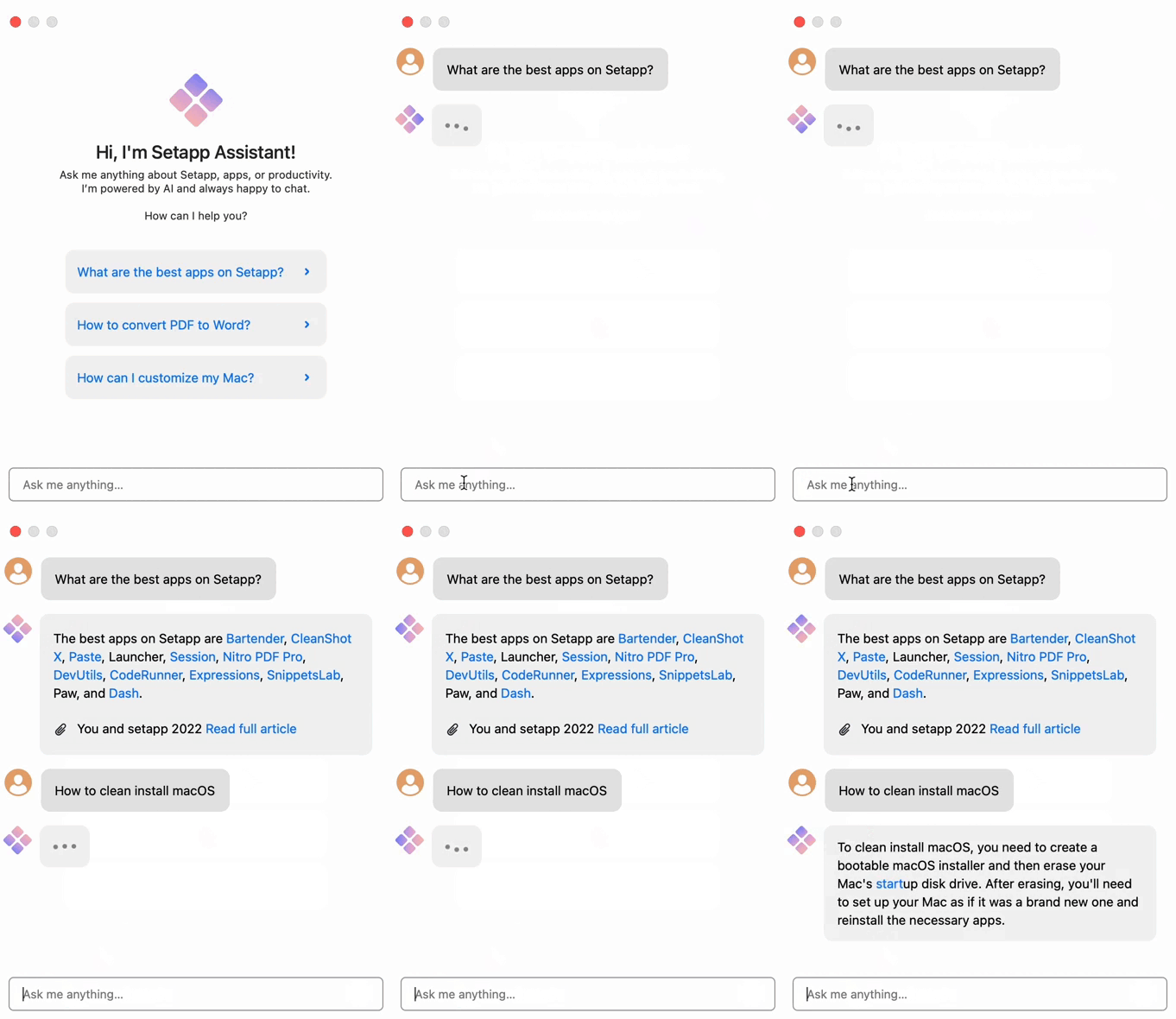
In addition to 240+ apps, Setapp also offers an AI Assistant that can help you find apps easily and instantly.
Some Of the most popular apps in each category on Setapp are as follows:
AI Category:

- Elephas – Personal AI Writing Assistant for Mac
- Plus – Work with text using AI
- TypingMind – Use new UI to chat with AI
- Craft – Create and structure documents
- Canary Mail – Read only important emails
- Luminar Neo – Improve your photos like a pro
- PhotosRevive – Colorize your old photos
- Taskheat – Learn to prioritize tasks
- Structured – Structure your day
Optimize Category:

- Launcher with Multiple Widgets – Customize your home screen
- Bartender – Personalize your menu bar
- iStat Menus – Track CPU, GPU, sensors, etc.
- BetterTouchTool – Save time with custom actions
- One Switch – Access macOS features fast
- Lungo – Keep your Mac awake
- TripMode – Save internet data
- CleanMyMac X – Speed up and declutter Mac
- Paste – Never lose anything you copy
- Unclutter – Easily manage your files, notes & clipboard data
- And More.
Work Category:

- UpLife – Your self-care assistant
- CleanShot X – Take better screenshots and GIFs
- TextSniper – Extract text from visuals
- Numi – Calculate and convert anything
- Dropzone – Complete everyday tasks faster
- HazeOver – Dim background windows
- Soulver – Convert and calculate in notes
- Gifox – Capture GIFs from your screen
- Dato – Stay on top of your schedule
- In Your Face – Get full-screen meeting alerts
- And More.
Create Category:

- PixelSnap – Measure anything on the screen
- SnapMotion – Capture snaps from your videos
- Permute – Convert audio, images, and videos
- Downie – Download YouTube videos
- Ulysses – Write and publish from one app
- MindNode – Mind map and brainstorm ideas
- TouchRetouch – Remove objects from photos
- Image2icon – Turn images into icons
- PDF Squeezer – Compress PDFs without quality loss
- Elmedia Player – Versatile media player
- Pulltube – Download and trim videos
- Typeface – Find the perfect font
- KeyKey Typing Tutor – Boost your typing speed
- News Explorer – Create your perfect RSS feed
- And More.
Develop Category:

- DevUtils – Offline development toolkit
- TablePlus – Query, edit, and manage databases
- Dash – Access API documentation offline
- Proxyman – Debug your web traffic
- SnippetsLab – Create a library of code snippets
- RapidAPI – Debug and test APIs fast
- Buildwatch – Track your build time in Xcode
- Expressions – Speed up work with regex
- Whisk – Code editor with live preview
- Base – Simplify SQLite file management
- XCOrganizer – Organize Xcode projects
- CodeRunner – Edit and run code faster
- Gitfox – Commit faster with superior diffs
- Core Shell – Full-featured SSH terminal
- Petrify – Create images from code snippets
- Hype – Create animated HTML5 content
- And More.
Features Of This Platform
- Setup Assistant: Setup offers AI Assistant, which can help you find any app, whether it’s for summarization, fixing spelling and grammar, rewriting content, explaining concepts, translating text, simplifying language, interacting with PDFs, and more.
- 240+ Apps: You will get access to 240+ popular MacOS And iOS apps for just $9.99. These apps cover various categories such as work, create, develop, and optimize.
- Essential Features: SetApp provides a range of features, such as a drag-and-drop interface, automated alerts, data backup, archiving, and task management. Employees can select multiple applications from different categories to handle projects, access files, schedule appointments using a calendar, and create strategic plans.
- Free Trial: You’ll get access to all 240+ iOS, web, and Mac apps for free for the first 7 days.
- 24/7 Support: One outstanding aspect of SetApp is its user support. Navigating the platform is like exploring a vast digital world; having good support is crucial when facing problems. Set App offers various ways for assistance to ensure users can easily get help when needed. You can contact them by submitting a request via their web portal, sending an email, chatting with their customer care team, or asking questions in Discord.
- No ads: The apps on Setapp do not have any ads, so you can use them without interruptions.
- Automatic Updates: Set App keeps your apps up to date automatically, so you always have the latest versions.
How Setapp Work?
Getting started with Setapp is simple. Here’s a step-by-step guide:
- Sign Up: To begin, sign up and become a Setapp member.
- Subscription: Purchase a subscription that suits your needs.
- Download Setapp: After subscribing, download the main Setapp application.
- App Store-Like Interface: Set app functions like an app store. The interface allows you to browse and search for various applications.
- App Selection: Choose and download applications that interest you through the Set app.
- Usage: Once downloaded, the applications work like regular apps on your computer. There’s no distinction in functionality.
- Regular Functionality: For instance, if you need a screenshot tool on your Mac, you can search for “screenshot” within Setapp. This will provide you with a selection of apps that can fulfill your screenshot needs.
Pricing And Plans:
Personal Plans:
1. $9.99/Month: For 1 Mac user (10% discount on Annual Plan: $8.99/Month)
2. $12.49/Month: For 1 Mac & 4 iOS users (10% discount on Annual Plan: $11.24/Month)
3. $14.99/Month: For 4 Mac & 4 iOS users (10% discount on Annual Plan: $13.49/Month)

Team Plans:
1. $9.99/Month: For 1 Mac user (Each extra device costs $2.49/month)
2. $8.99/Month for Annual Purchase: For 1 Mac user (Each extra device costs $2.49/month)

Is Setapp Worth It?
The $9.99 per month subscription cost for Setapp may seem small, roughly 33 cents per day, but let’s delve into why it’s a great value. Let’s see the worth of this platform!
Consider 7 premium software components for Mac that are included in Setapp:
- CleanMyMac X – $35.64/yr
- Gemini 2 – $19.99/yr
- Disk Drill – $39.99/yr
- Dev Utils – $29.99/yr
- Ulysses – $39.99/yr
- Permute – $14.99/yr
- Luminar Neo – $71.89/yr
If you were to purchase these apps individually via the Mac App Store, the total cost would be $252.48 for a year.
However, with Setapp, the total cost for a 12-month membership is $119.88. This is already a significant savings.
Moreover, consider that some apps, like CleanMyMac X, often require additional charges for version upgrades. Setapp subscribers don’t face these hidden costs and always have access to the latest versions.
If you were to install each of the 240+ apps available through Setapp individually, the cost could exceed $1000. Yet, with Setapp, you only need to pay $9.99 per month. Opting for an annual subscription provides a 10% discount, allowing you to save even more.
Pros And Cons Of Setapp
Pros:
- Easy-to-Use Interface: The Mac Store-like interface makes navigation and usage straightforward.
- Extensive App Collection: Over 240 apps are available for a base price, offering a wide range of functionalities.
- Top-Tier Apps: Setapp includes high-quality, top-tier apps in its collection.
- Free 7-Day Trial: Users can explore the service risk-free with a free 7-day trial period.
- Affordable Pricing: The subscription pricing is affordable, providing value for various apps.
- User-Friendly Interface: The interface is user-friendly, making it accessible to a broad audience.
- Setapp AI Assistant: Apart from 240+ apps, you’ll also get access to their own trained AI chatbot, which can help you find any app based on your problem. Just enter your problem via prompt and ask for an app, and it will give you the list of the best iOS, web, and MacOS apps available to solve that problem.
Cons:
- Limited iOS Apps: The availability of iOS apps is limited, potentially limiting functionality for iOS users.
- Additional Device Costs: Adding more devices may incur extra costs, which could be a drawback for users with multiple devices.
- Missing Major Apps: Some significant apps are still absent from the Set app collection.
- Not Available for Windows and Android: Setapp is exclusive to macOS and iOS, excluding users on Windows and Android platforms from accessing its services.
In terms of performance, SetApp operates smoothly on any Mac that meets the necessary system requirements. The apps downloaded through the Set app generally work well without issues, providing a seamless experience.
Setapp Demo Video

Setapp Reviews
Been a happy user for 3 years now, I use like 15 apps from it, worth it for sure.
Leviathan
In my opinion and use case, yes it is worth buying. I am a heavy Ulysses user and find Clean my Mac very useful. I keep about 10 apps installed on my Macs. I also like trying new apps, and Set app is a great way to do that.
ManorTee
I have been a macOS user for years, and I have lost the track of all the apps I have tested (both free and premium accounts). Setapp is the only platform that gives you access to so many apps with one single subscription that can actually pay itself. I can’t say that I use all apps in your catalog, but there are some “big names” there that would be pricier when paying for them separately in a monthly basis. I’m glad to see that you’re keeping it up and consistently adding more apps! Hopefully, I will see more emphasis in generative AI apps and design tools.
Rita Arosemena
I honestly signed up for the trial to get a single app (DisplayBuddy) and now use a ton of the apps and think it’s a surprisingly good deal. For me it’s Luminar Neo + CleanMyMac + DisplayBuddy + iStat… but now I have a bunch of other utilities that have saved me a ton of time/sadness. (Disk Drill, Gemini, etc.)
Jesse Robbins
First ever subscription model for macOS apps of different companies. It’s awesome, I regret purchasing many apps before.
Akeef Petek
AI Tools You Must Explore
- Mobians AI – Best Sonic OC Generator
- PizzaGPT
- CollovGPT
- Cactus AI
- Mermaid Chart
- Roast Generator AI
- TinyWow
- Jeffrey Celavie App
- Looka AI Logo Maker
- Kaiber AI
- CheatGPT
- Namelix Name Generator
Frequently Asked Questions
Is Setapp free?
Yes, the platform offers 7 days free trial for those who want to test the platform before they actually pay for it.
Is Setapp only for Mac?
Initially, Set App was designed exclusively for Mac OS. However, they later expanded their services by introducing an iPhone section, featuring apps that function seamlessly on both Mac and iOS devices.
Is Setapp safe?
Apple wants people to use their app store, but it’s okay to download apps from SetApp. These apps are safe because many of them have already passed Apple’s security checks and are also available in the official app store, sometimes at a cost.