
Etsy sellers, print-on-demand creators, Cricut users, and designers often spend too much time cleaning up product photos or design assets.
Traditional paid and free online background removers like Remover BG, Canva, Adobe, etc, require uploading every image to the cloud, dealing with credit systems, waiting in queues, or worrying about data. Many tools also struggle with fine details like hair, fur, or semi-transparent edges.
Creative Fabrica Studio Desktop solves these frustrations with a free local AI background remover that runs directly on your computer. After downloading the model once, you can process images privately and quickly without uploading anything or spending credits on supported local tools.
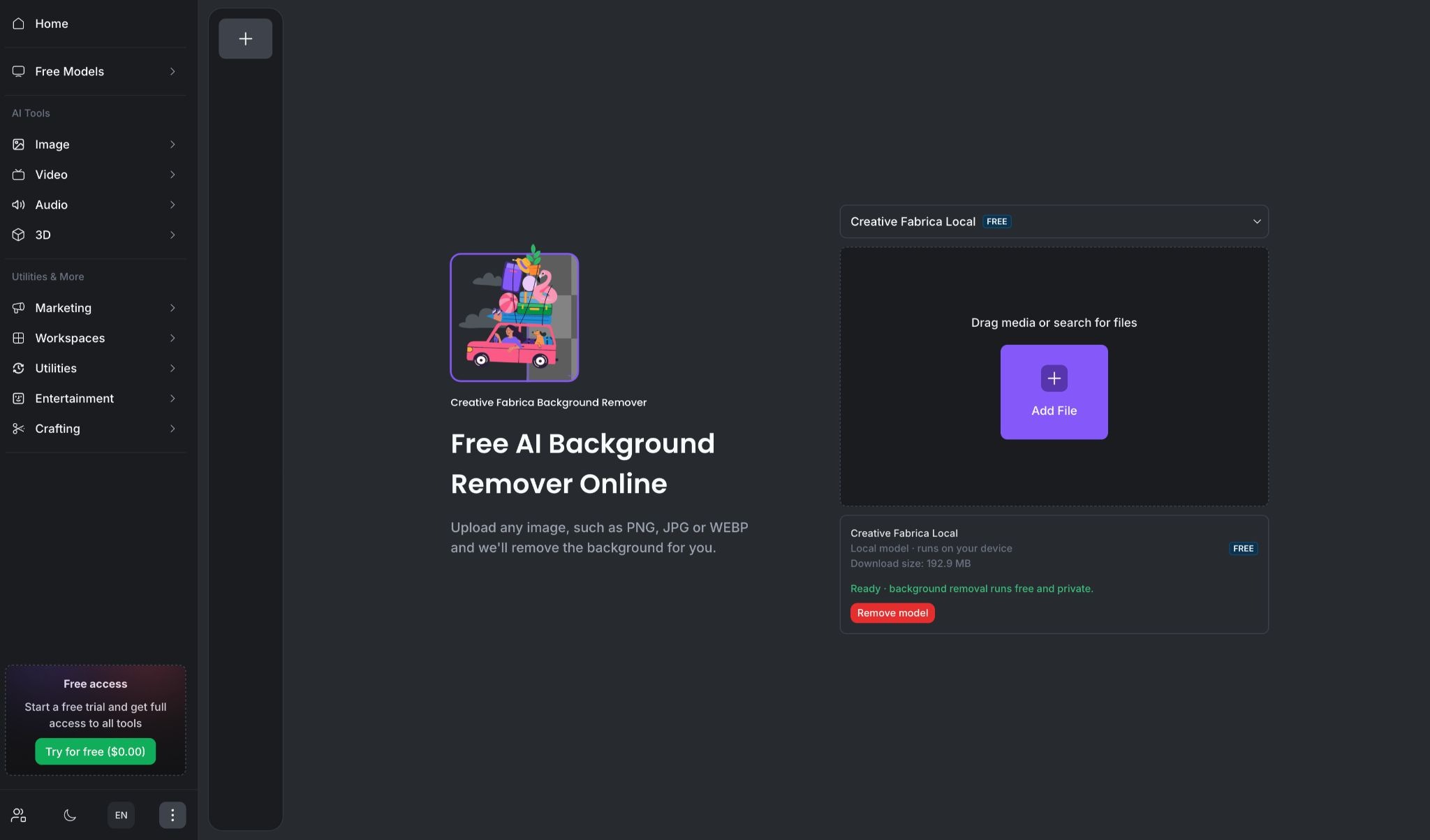
Trust me, if you will try once, you will thank me later! Before you try, just spare your few important minutes to go through all the goods and bads we have experienced with this platform.
What Is Creative Fabrica Studio Desktop?
Creative Fabrica Studio Desktop is a free Windows and Mac desktop application that brings good quality AI creative tools into one workspace. It includes several local AI models that run on your own hardware, such as the Background Remover, Image Upscaler, Text to Speech, and others.
The app connects seamlessly with Creative Fabrica’s broader Studio environment, so your results stay in the same workspace for further editing. You can switch between completely local free tools and optional cloud-powered premium models with one click when you want extra speed or advanced features.
We tested many tools but we feel background remover for Mac and Windows are available but each tool has problems that we mentioned in the first paragraph. The AI background remover by creative fabrica studio stands out because it is trying to solve all these problems.
Apart from their offline background remover, they offer a wide range of tools which are mentioned below.
| Tool Name | Category | Key Benefit | Local/Free Option |
|---|---|---|---|
| AI Background Remover | Image | One-click transparent PNGs with precise hair & edge detection | Yes (Free Local) |
| Image Upscaler | Image | Enhances image resolution up to 4× | Yes (Free Local) |
| Free Image Generator | Image | Text-to-image generation | Yes (Free Local) |
| AI Image Editor | Image | Upload and edit images with AI tools | Available |
| AI Image Generator | Image | Advanced image creation from prompts | Available |
| AI Photo Styles | Image | Apply artistic and professional styles to photos | Available |
| AI Mockup Generator | Image | Realistic product mockups | Available |
| People Remover | Image | Automatically removes people from photos | Available |
| AI Logo Creator | Image | Quick professional logo generation | Available |
| Image Vectorizer | Image | Converts raster images to scalable SVG | Available |
| Image Alive | Image | Brings static images to life with motion | Available |
| AI Video Generator | Video | Creates videos from text descriptions | Available |
| AI Video Editor | Video | AI-powered video editing | Available |
| AI Video Upscaler | Video | Upscales videos to 1080p or 4K | Available |
| AI Music Generator | Audio | Generates original music tracks | Available |
| AI Sound Effect Generator | Audio | Creates custom sound effects | Available |
| AI Speech Generator | Audio | Text-to-natural speech conversion | Yes (Free Local) |
| 3D Model Viewer | 3D | View and validate 3D models | Available |
| 3D Model Generator | 3D | Generates 3D models | Available |
| 3D Print Generator | 3D | Prepares models for 3D printing | Available |
| AI Design Reviewer | Utilities | AI reviews and suggests improvements on designs | Available |
| AI Watermark Remover | Utilities | Removes watermarks quickly | Available |
| File Converter | Utilities | Converts files between formats | Available |
| Image Compressor | Utilities | Compresses images while maintaining quality | Available |
| Image Resizer | Utilities | Resizes images easily | Available |
| Color Palette Picker | Utilities | Extracts and suggests color palettes | Available |
| Studio Ad Campaigns | Marketing | Creates short-form ad campaigns | Available |
| Subtitle Generator | Marketing | Generates subtitles for videos | Available |
| Product Manager | Marketing | All-in-one media generation for products | Available |
| Lumo Boards | Workspaces | Collaborative boards for ideas | Available |
| Studio Designer | Workspaces | Full creative design workspace | Core Tool |
| AI Quote Generator | Crafting | Turns quotes into beautiful artwork | Available |
| AI Collage Maker | Crafting | Creates collages from photos | Available |
| Wedding Invite Generator | Crafting | Designs wedding invitations | Available |
Let’s get back to our main highlighting tool i.e. Background Remover
Why Local AI Background Removal Matters?
Cloud-based background removers are convenient but come with drawbacks. Every upload takes time, uses bandwidth, and raises privacy questions—especially when you’re working with client photos, product shots, or personal designs.
Many services also limit free usage with credits or watermarks. This point is one of the most important point why talking about this local as well as completely free background remover matters.
A local tool changes the workflow. After the initial model download (around 193 MB for the Background Remover), processing happens offline on your hardware.
There are no usage caps or extra costs for the local version. This makes it ideal for batch work, such as cleaning dozens of Etsy listing photos or preparing multiple transparent PNGs for Cricut or sublimation projects.
It also works well on modern computers and gives you full control. Your images stay private, and you can continue editing the transparent results immediately inside the same Studio workspace—no need to download and re-upload elsewhere.
Hands-On: How to Remove Backgrounds Locally
Getting started is simple. Here’s a practical workflow using the AI Background Remover for a typical creator task—preparing clean product photos for your work.
Step 1: Install the Desktop App
Download the free installer (about 100 MB before installation and 256 MB after installation) from the official site for Mac. The process is simple with no complicated setup wizard. Create a free account (no credit card required).
Step 2: Access the Background Remover
Open the app and navigate to the Free Models or Image tools section. You’ll see the Background Remover card. Select it and download the local model. Once ready, the interface shows “Ready – background removal runs free and private.”
Step 3: Upload Your Image
Drag and drop your photo or click to add a file. The tool supports common formats like PNG, JPG, and WEBP. For best results with product shots, use well-lit images with clear subjects.
Step 4: Let the Local AI Work
The model analyzes the image on your device, identifies the main subject, and separates it from the background at the pixel level. It handles complex details like hair, fabric edges, and semi-transparent areas automatically. Processing time depends on your hardware—modern laptops handle it quickly. We have tested it on a macbook pro (M1 pro). It generated output in just a few seconds.
Step 5: Download the Transparent PNG
In seconds you get a clean, high-resolution transparent PNG ready to download or use directly in the Studio workspace.
Example Result:
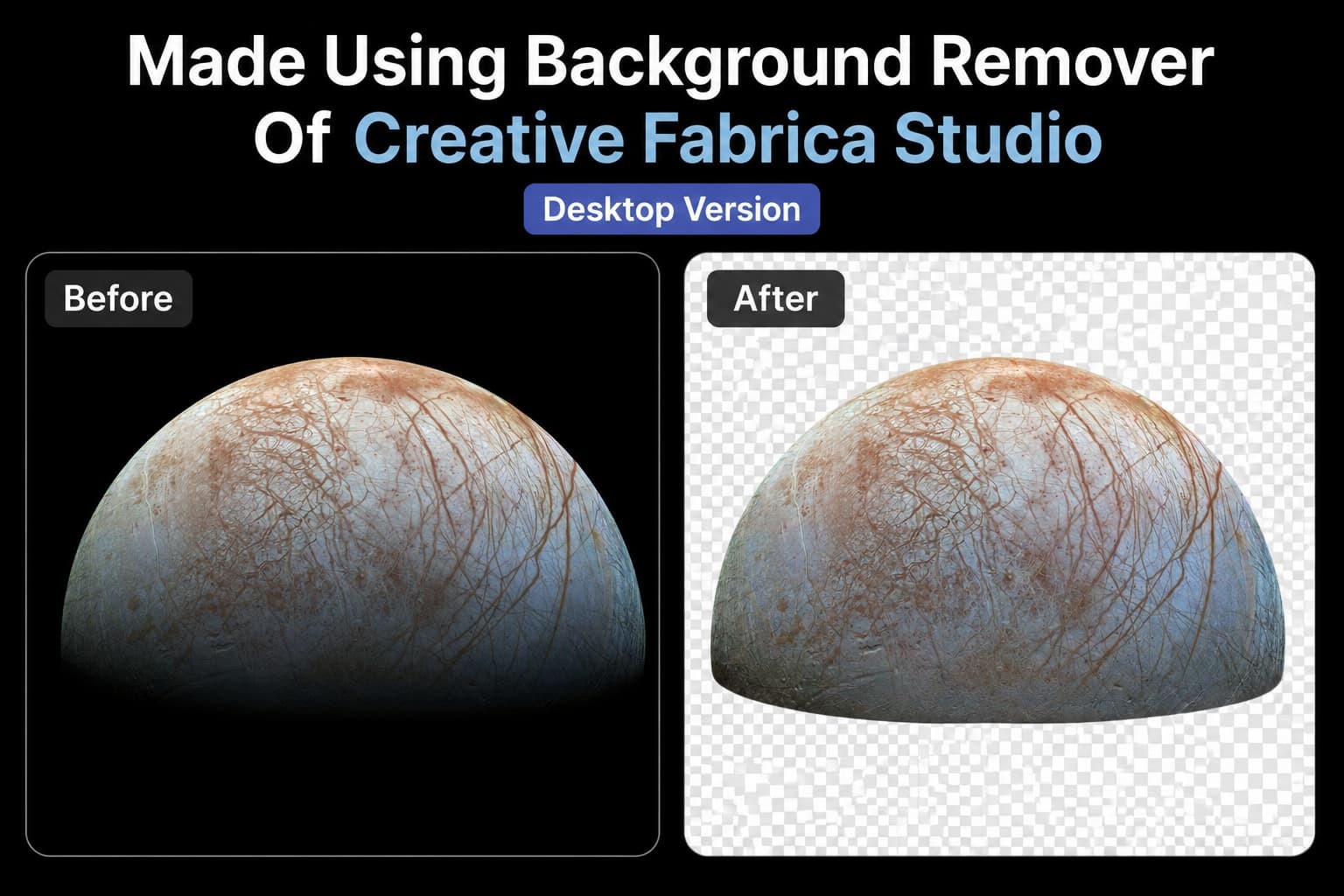
The image above shows a realistic before-and-after using a high-detail planetary photo of Europa. The solid black background is cleanly removed while preserving intricate surface textures, craters, and color variations—exactly the kind of precise result digital artists, educators, and etsy/amazon sellers as well as content creators need for work.
After removal, you can immediately continue in Studio: upscale the image, add a new background, convert it to a vector/SVG, apply photo styles, or generate variations—all without leaving the platform.
Who Is This AI Tool Best For?
1. AI Enthusiasts Building Personal AI Companions or Avatars
Users experimenting with character-consistent AI avatars or virtual companions frequently generate many reference images. They use the tool to create clean transparent reference sheets for consistent character training across multiple models, keeping all personal avatar development completely offline and private.
2. AI Faceless YouTube & TikTok Channels
Creators who run faceless AI youtube channels (motivational, facts, finance, or storytelling) often need clean cutouts of people, objects, or scenes for thumbnails and short clips. Instead of paying for stock footage or struggling with online tools that add watermarks, they can process dozens of images locally in batches, remove backgrounds, and directly use the transparent files, saving both time and money.
3. Printable Wall Art & Digital Product Sellers
Sellers who create and sell printable wall art, planners, or wall decor on Amazon, Etsy, and other platforms, frequently need to hide illustrations or photographs to place them on different backgrounds or combine multiple elements. With the local tool, you can remove backgrounds from their own photos or stock images, convert them to vectors if needed, and quickly create multiple color variations, all while keeping full control over their files.
4. Teachers & Educational Content Creators
Teachers and homeschool creators frequently make worksheets, flashcards, and lesson materials. They often photograph real objects (science experiments, historical artifacts, or nature items) and need clean versions with transparent backgrounds to drop into Canva, PowerPoint, or printable PDFs. The local AI handles fine details well (like leaves or small objects) and keeps everything private.
5. Wedding & Event Planners / Stationery Designers
People who design custom wedding invitations, seating charts, or event signage often work with couple photos or decorative elements. They need clean cutouts to place on elegant backgrounds or combine with calligraphy. The local tool gives them fast, high-quality results without worrying about uploading personal photos to online services.
6. Interior Designers & Home Decor Sellers
Interior designers frequently photograph rooms and furniture for client presentations or product catalogs. They need to remove backgrounds from furniture pieces so they can show how items would look in different spaces. This AI Background Remover helps create clean product cutouts quickly, which can then be placed into room mockups inside Studio.
7. KDP Book Cover Designers
Many Kindle Direct Publishing authors design their own covers or hire freelancers. A common pain point is removing elements (like a character, object, or landscape) from stock photos to layer them cleanly on a book cover. The local Background Remover lets you quickly create transparent PNGs of subjects while preserving fine details like hair or fabric textures, then immediately upscale or stylize them inside the same Studio workspace before exporting for print.
Pros and Limitations
Pros:
- Completely free for the local Background Remover (no credits or subscriptions required for this tool).
- Local processing protects privacy and works without constant internet after setup.
- Good edge detection on fine details.
- Available on both Windows and Mac.
- You don’t need to visit different websites for other tools
Limitations:
- Batch processing is needed. we hope team will work on it in the future
- Performance depends on your computer’s hardware. A modern machine with decent RAM and GPU delivers fast results; older laptops will be slower.
- Very complex or low-quality images may still need minor manual tweaks in the Image Editor.
- Some advanced premium models in the app use cloud processing and require an internet connection.
- The desktop app is still new, so occasional small UI glitches appear, though nothing that stops the workflow.
Overall, the balance of free local tools with optional cloud upgrades makes it a strong option for creators who process many images regularly.
Frequently Asked Questions
1. Is Creative Fabrica Studio Desktop free?
Yes. The desktop app itself is free to download and use. The local Background Remover and several other core AI tools run for free with no credit system or usage limits after the model is installed.
2. Does the background remover run locally?
Yes. After you download and install the local model, supported tools like the Background Remover process images directly on your computer without uploading them to the cloud.
3. Does it work on Windows and Mac?
Yes. There is one installer for both Windows and Mac.
4. Can I use it for Etsy product photos?
Absolutely. It is well-suited for creating clean transparent or white backgrounds for marketplace listings.
5. Can I make transparent PNG files for Cricut?
Yes. The tool outputs high-resolution transparent PNGs that work perfectly with Cricut Design Space and similar cutting software.
6. Is it an alternative to cloud background removers?
It serves as a strong free local alternative for privacy-focused or high-volume workflows, while still offering the option to use cloud tools when desired.
Final Thoughts
If you regularly remove backgrounds from product photos, designs, or craft assets, Creative Fabrica Studio Desktop’s free local AI Background Remover is our personal recommendation. It eliminates the friction of uploads and credits while delivering clean, professional results that integrate directly into your creative workflow.
Whether you sell on Etsy, create POD products, design for Cricut, or simply want a private and efficient tool for everyday image editing, this desktop app puts capable local AI and other tools right on your computer.
Go and download Creative Fabrica Studio Desktop and explore the free local Background Remover for yourself. Many creators are already switching from Adobe, Canva, And Remover BG, to use this because of their core problem solving features. Give it a try!