
TileMaker Review: Are you looking for a hassle-free AI way to generate unique wallpapers and backgrounds? If yes, then try out TileMaker, an AI-powered tool that allows you to create visually appealing designs effortlessly. In this article, we will provide an overview of TileMaker, its key features, demo, alternatives, pricing, various use cases, and address frequently asked questions.

| AI Tool Name: | TileMaker |
| Category: | Best AI Design Tools |
| Features: | Instant Wallpaper Generation, Customization Options, etc |
| Cost: | Free |
| TileMaker Free Alternative: | Wallpapers.fyi |
What Is TileMaker?
TileMaker is a free AI tool that quickly generates unique wallpapers and backgrounds. With its tech stacks like Material Diffusion, Replicate, Vercel, and GitHub integration, TileMaker ensures a seamless user experience. You just need to add your prompts and it will ready your design in seconds.
What Are The Features Of TileMaker AI Tool?
- Instant Wallpaper Generation: With TileMaker, you can generate custom wallpapers and backgrounds in mere seconds. The AI-powered tool automates the process, saving you time and effort.
- Customization Options: Tailor your wallpapers to your liking with TileMaker’s customization options. You have the freedom to adjust parameters such as the number of tiles, tile colors, and tile sizes. This allows you to create unique and personalized designs.
- Flamingo Oil Painting: Add an artistic touch to your wallpapers using TileMaker’s flamingo oil painting feature. This option enhances visual appeal and helps create eye-catching backgrounds.
- GitHub Repository: Developers can take advantage of the TileMaker GitHub repository to build their own AI-powered applications. The repository serves as a foundation for further customization and integration into existing projects.
- User-Friendly Interface: TileMaker is designed with user-friendliness in mind. Whether you’re a novice or an experienced designer, the tool’s intuitive interface ensures that anyone can create aesthetically pleasing backgrounds without requiring technical expertise.
What Are The Use Cases Of TileMaker AI Tool?
- Graphic Designers: Graphic designers can benefit from TileMaker’s seamless generation process and customization options. It simplifies the creation of unique and visually appealing backgrounds for their design projects.
- Website Developers: Web developers can utilize TileMaker to generate custom backgrounds for websites and online platforms. The tool’s flexibility allows for seamless integration with various design elements.
- App Developers: TileMaker’s GitHub repository empowers app developers to create AI-powered applications that generate distinctive wallpapers and backgrounds. It enables them to incorporate visually engaging features into their apps.
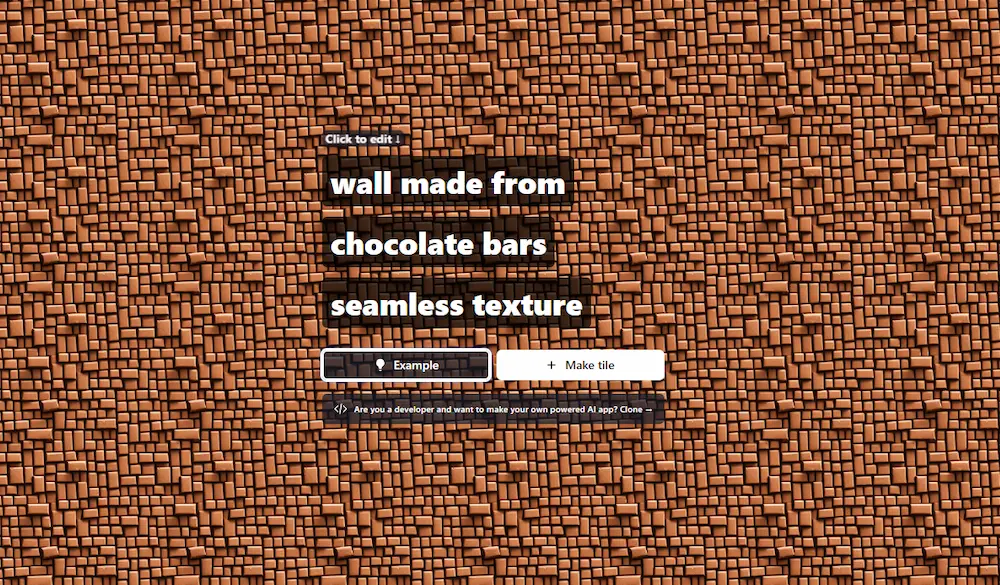
TileMaker Demo
Frequently Asked Questions On TileMaker
Is TileMaker a free tool?
Yes, TileMaker is completely free to use.
How quickly can I generate a wallpaper using TileMaker?
With TileMaker, you can generate a custom wallpaper within seconds.
Can I customize the colors and sizes of the tiles in my wallpapers?
Absolutely! TileMaker provides customization options for tile colors and sizes, allowing you to create personalized designs.
Can developers use TileMaker for their own applications?
Yes, developers can leverage the TileMaker GitHub repository to create their own AI-powered applications that generate unique wallpapers and backgrounds.
Does TileMaker require any software installation?
No, TileMaker is an online tool that doesn’t require any software installation. Simply access it through your web browser.
Are there any limitations on the number of wallpapers I can create with TileMaker?
There are no limitations on the number of wallpapers you can create with TileMaker. Feel free to generate as many as you need!
Best TileMaker Alternatives
- Wallpapers AI
- Wallpapers.fyi
- Background.lol
- Image Variations
- AI Backdrop
- AIGraphics
- IMGtopia
- Green Screen AI
AI Tools You Must Explore